
Strategic Dayparting for Retail Media: Optimizing Amazon, Walmart, Instacart, and Target
This UX Project Case Study evaluates the Hourly Bidder 2.0, an automated ad-scheduling tool designed to optimize advertising budgets and bids based on high-demand periods.
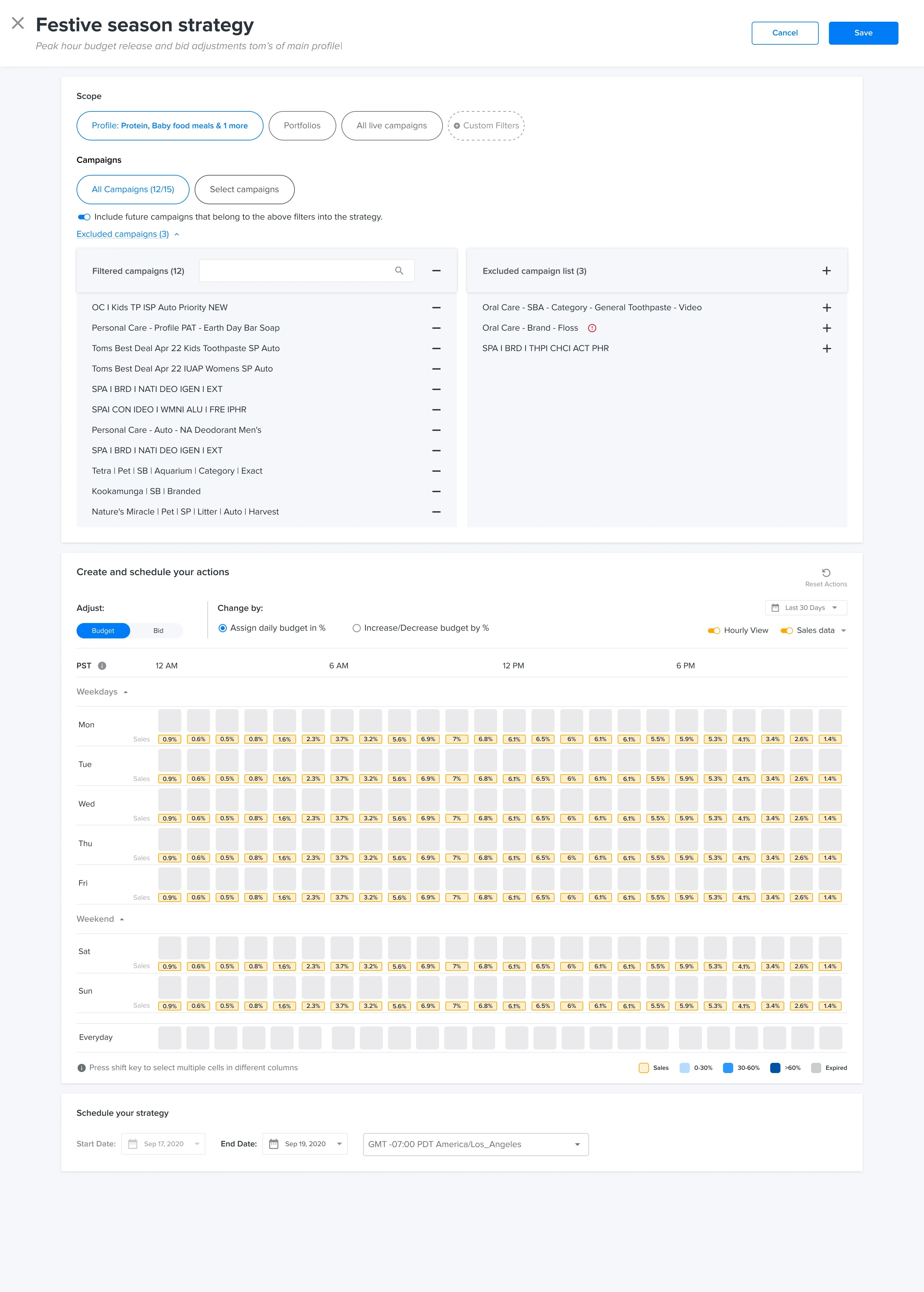
Hourly Bidder 2.0: Intraday budget release and hourly bid adjustment engine
Project Overview
Hourly Bidder 2.0 is an enterprise-grade AdTech solution designed to automate intraday bidding and budgeting for major Retail Media Networks. The primary goal is to shift campaign managers from manual, intuition-based adjustments to a data-driven "set and monitor" strategy that maximizes ROAS during peak traffic hours.
The Problem Statement
Before this version, users faced significant friction in three areas:
Manual Labor
Creating rules for 24 hours across 7 days was a repetitive, error-prone task.
Logical Ambiguity
Users were unclear if a 20% budget reduction applied to the original "base" budget or the previously adjusted value from the hour before.
Data Silos
Strategic decisions were made without seeing hourly sales or CPC data directly in the tool.
User Persona & Impact
Understanding user archetypes enabled targeted solutions for enterprise campaign managers, brand retailers, and data analysts:
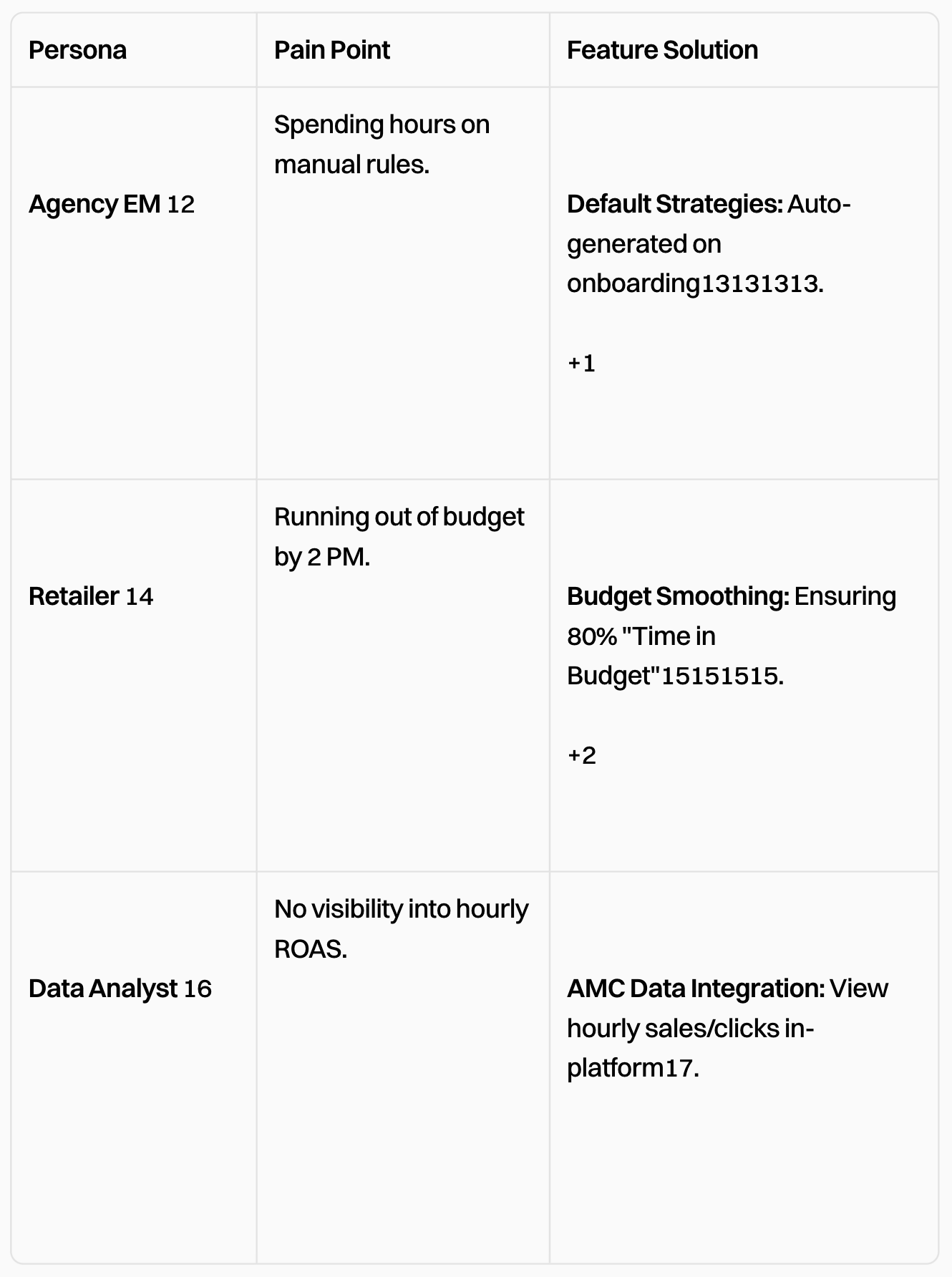
Persona Matrix: Mapping target user roles to specific intraday bidding pain points and UX feature solutions
| Persona | Pain Point | Feature Solution |
|---|---|---|
| Agency EM | Spending hours on manual rules. | Default Strategies: Auto-generated on onboarding. |
| Retailer | Running out of budget by 2 PM. | Budget Smoothing: Ensuring 80% "Time in Budget". |
| Data Analyst | No visibility into hourly ROAS. | AMC Data Integration: View hourly sales/clicks in-platform. |
Core Features & UX Solutions
A. Interactive Heatmap Scheduler
The UI utilizes a 7x24 grid that allows users to drag through days and hours to select time slots.
This solves the "ease of creating strategies" by allowing bulk selection instead of repeating steps for every hour.
The yellow tags in each cell show Sales % for that specific hour, allowing users to align budget increases with high-volume periods.
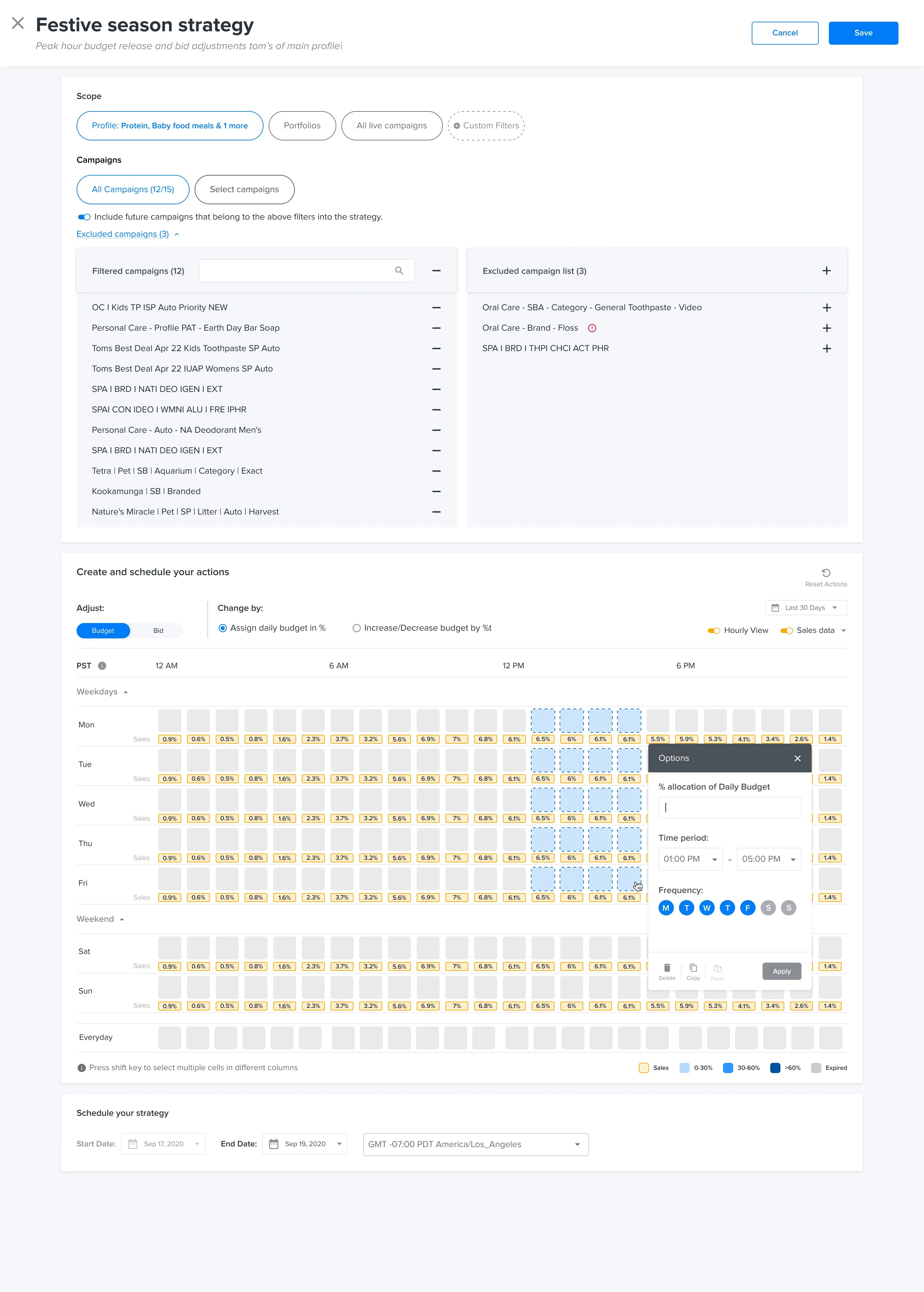
Interactive Heatmap Scheduler: 7x24 grid with bulk time selection and hourly sales % data overlays
The "Options" Modal: Eliminating Confusion
As shown below, clicking a time block opens a precision setting tool.
Calculated Previews
The modal provides a real-time calculation: "35% of a $100 daily budget becomes $35". This eliminates the "base vs. previous" ambiguity.
Granular Frequency
Users can toggle specific days of the week (M, T, W, T, F, S, S) within the same time block, allowing for distinct weekday vs. weekend strategies.
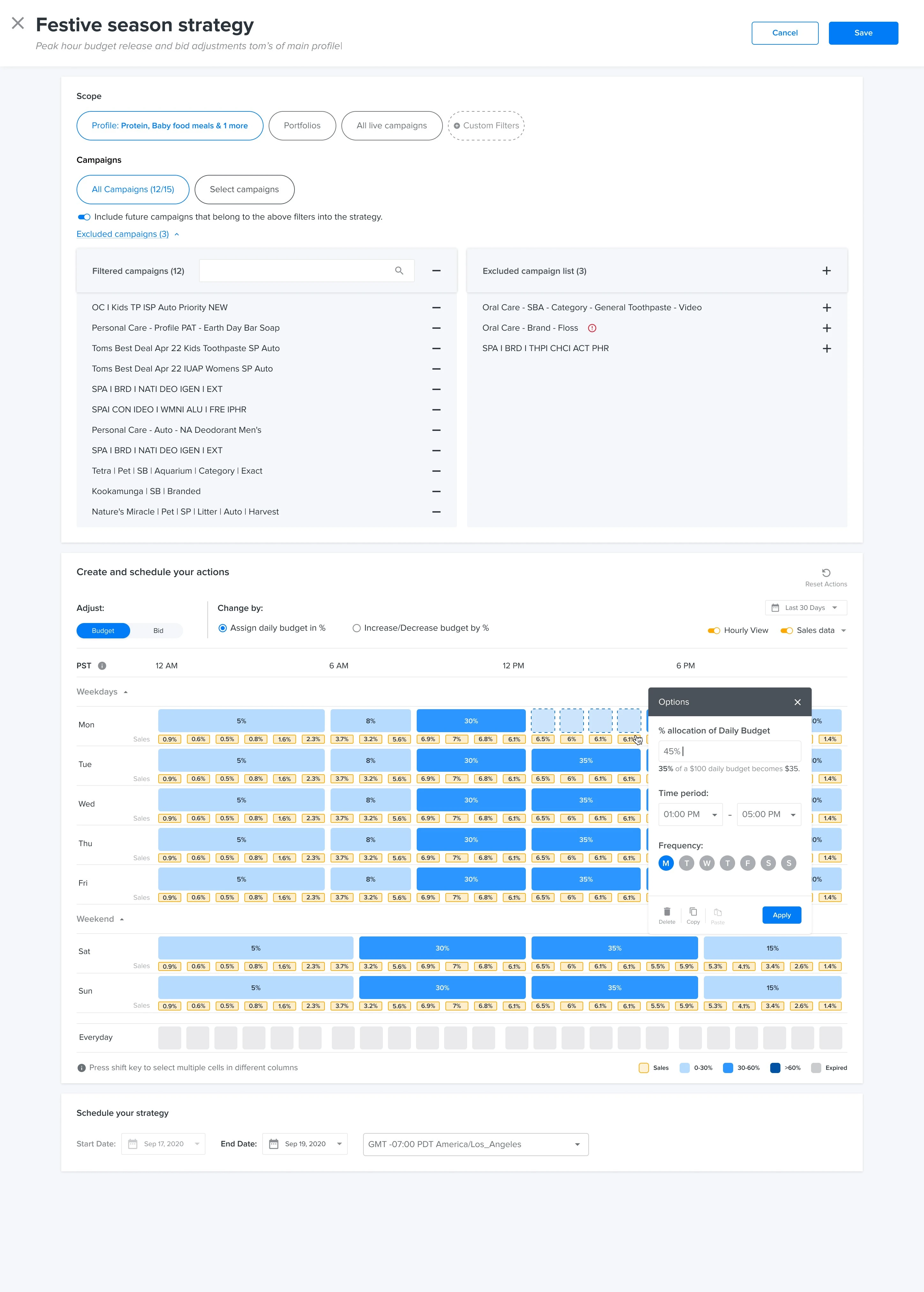
Options Modal: Live budget calculation preview ($35 of $100 daily budget) and weekday/weekend frequency toggles
Platform-Specific Intelligence
The engine adapts its logic based on the retailer's specific constraints:
Walmart Logic
The tool handles Walmart's unique "Total vs. Daily" budget priority and applies minimum spend thresholds so ads don't pause due to invalid low bids.
Amazon Logic
It leverages Amazon Marketing Cloud (AMC) data for 30-day lookbacks to generate default "Spotlight" recommendations.
Automated Strategy Logic (The "Engine")
The system categorizes hours into High, Medium, and Low ranks based on sales volume:
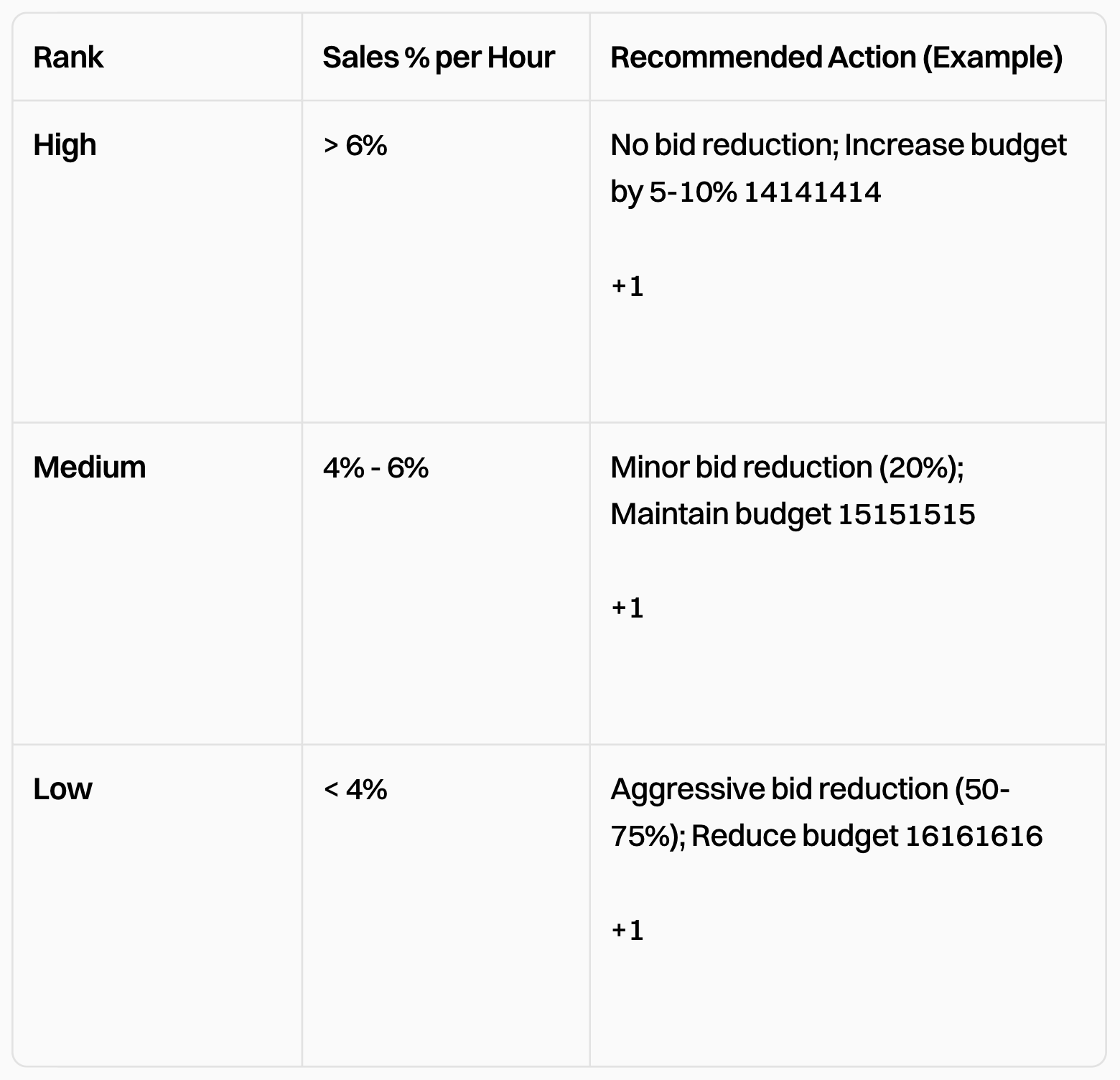
Strategy Logic Rules Table: High (> 6%), Medium (4% - 6%), and Low (< 4%) sales volume rank actions
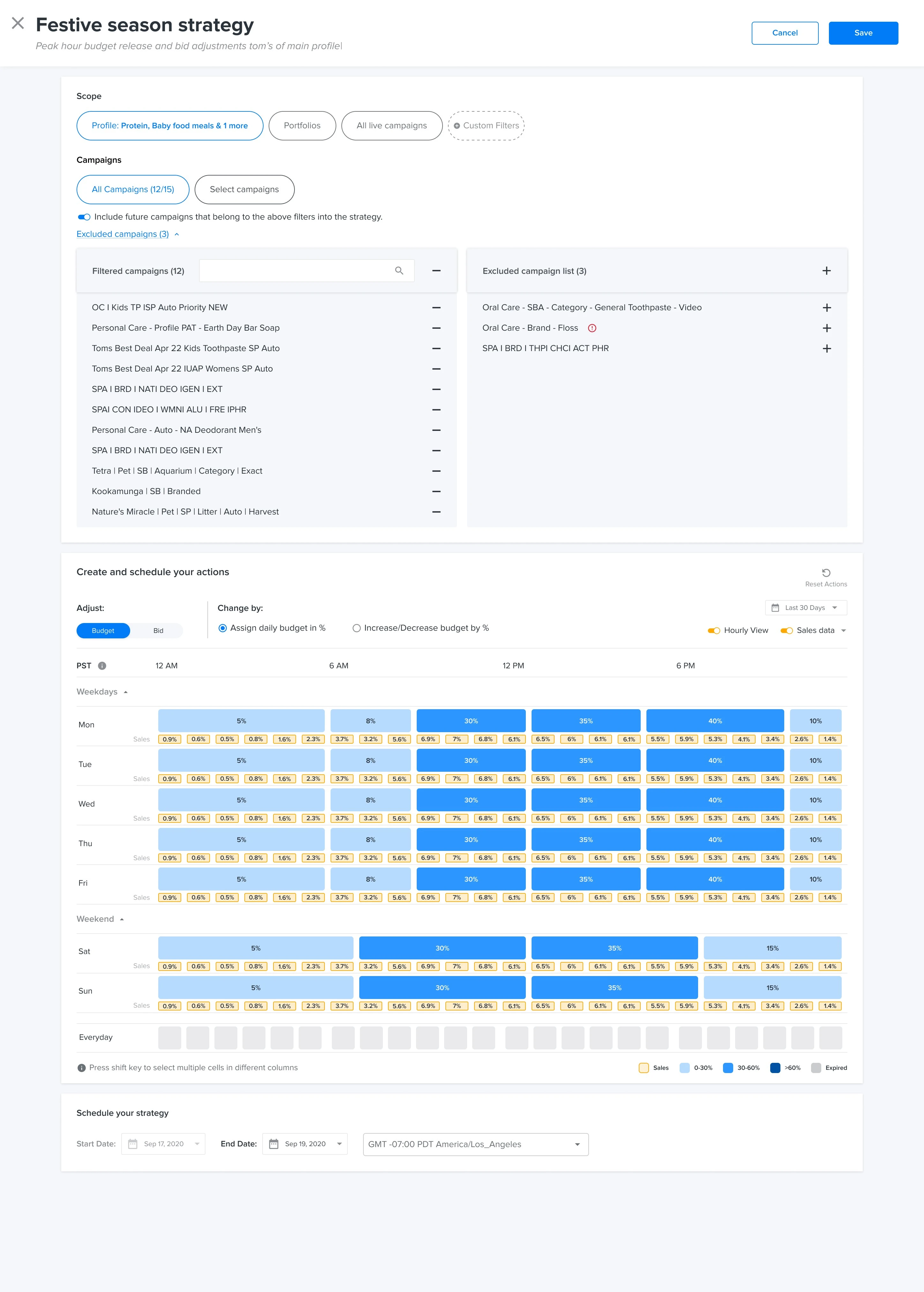
Full Festive Season Dayparting Strategy: Color-coded intraday budget allocation matrix
Heuristic Review & Improvements
Visibility of System Status
The "Time in Budget" metric (80% threshold) acts as a health check, showing users if their strategy is actually working or if they are losing sales early in the day.
Error Prevention
The UI uses red outlines and disables the "Save" button if rules overlap or exceed logic limits, preventing costly advertising mistakes.
Flexibility
The "Include future campaigns" toggle ensures that the strategy scales automatically as new ads are launched.
Conclusion
The Hourly Bidder 2.0 shifts the user from "Builder" to "Editor." Instead of manually inputting rows of data, the user interacts with a visual grid fueled by automated recommendations, significantly reducing the "Time to Live" for complex advertising strategies.
Maximizing ROAS during peak traffic: Shifting campaign managers from manual intuition to automated intraday dayparting ensures retail media budgets are unlocked when shoppers have the highest intent to buy.