
AI Attack Surface Management Platform
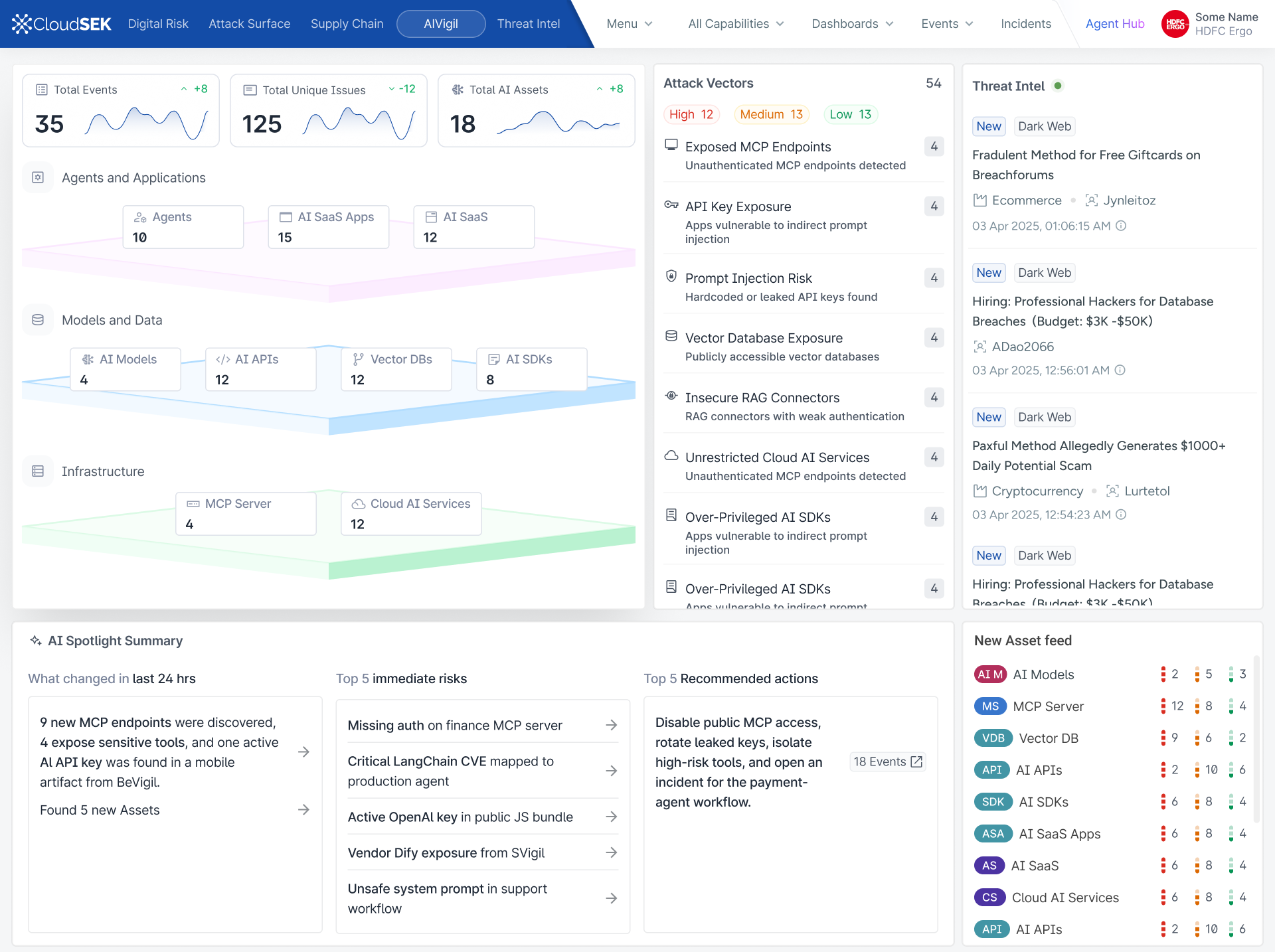
With the rapid adoption of LLMs, MCP servers, AI agents, vector databases, and AI SDKs, organizations suddenly had hundreds of AI assets exposed across public infrastructure without realizing it.
Traditional security scanners were built for web applications and cloud infrastructure—not for AI systems.
CloudSEK identified an emerging category: AI Attack Surface Management.
I led the design of AI Vigil, a platform that continuously discovers AI assets, identifies security risks unique to AI systems, and helps security teams understand, prioritize, and remediate them before attackers exploit them.
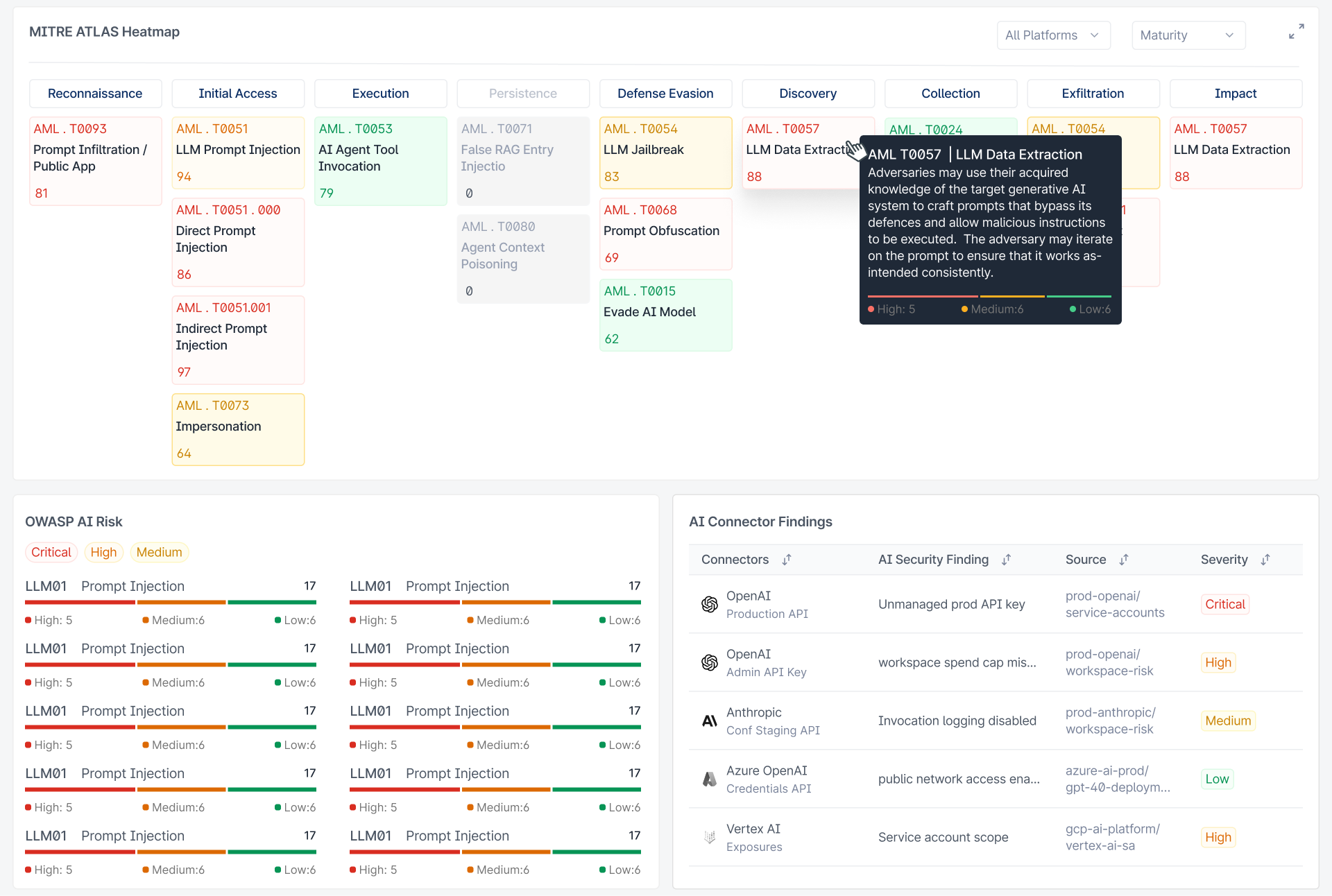
The platform combines public attack surface discovery, private AI connectors, AI-specific threat intelligence, and MITRE ATLAS mapping into one unified experience.
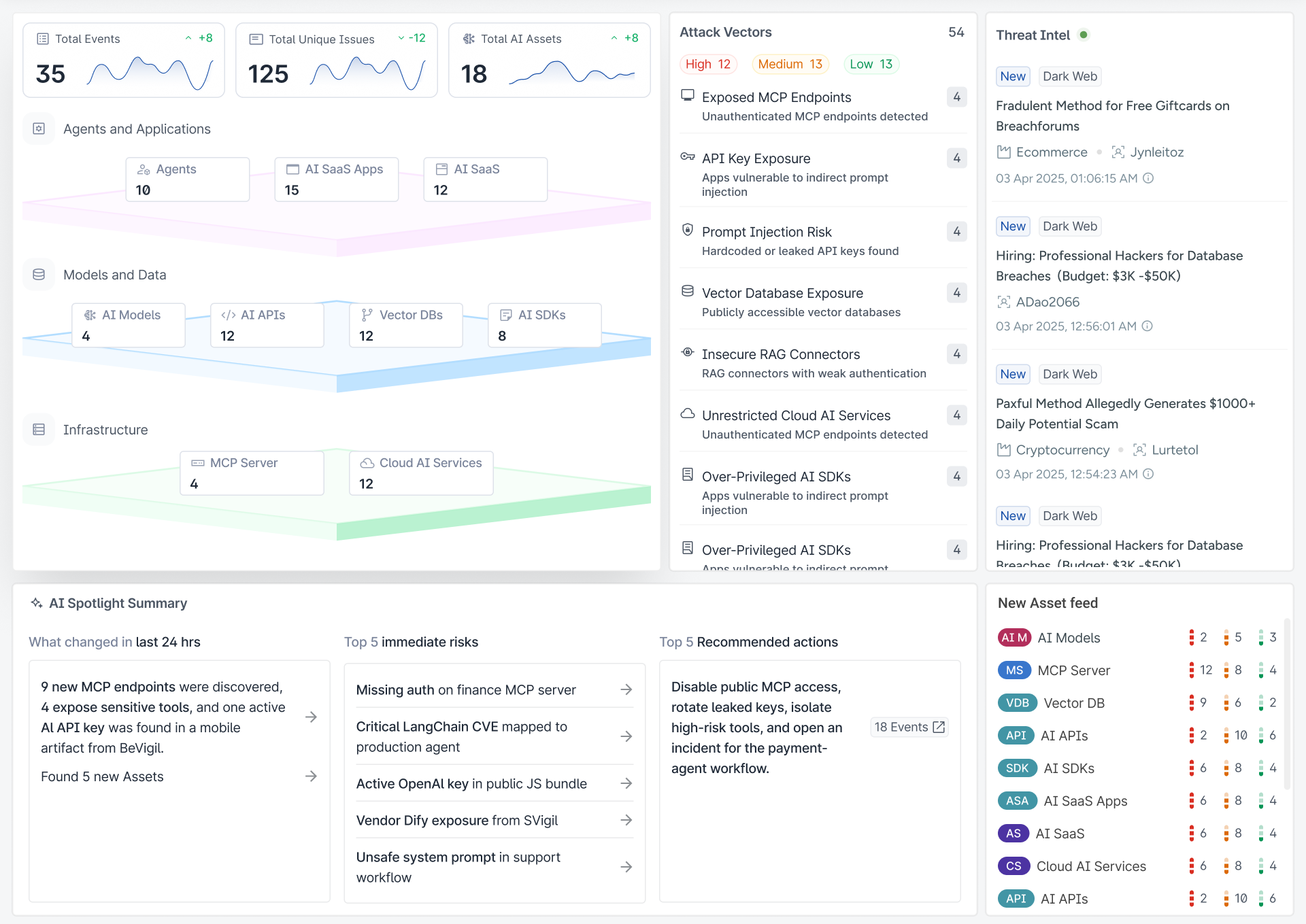
AIVigil Dashboard: Discovering Agents, Models, MCP Servers, Vector Databases, and Attack Vectors
The Problem
AI was becoming part of the attack surface
Security teams already had tools to monitor traditional infrastructure:
- Cloud assets
- APIs
- Infrastructure
- Mobile applications
But AI introduced another layer, with almost no visibility into:
- MCP Servers
- AI Agents
- LLM endpoints
- AI SDKs
- Vector databases
- Prompt injection risks
- System prompt leaks
- AI credentials
- Agent permissions
These assets were growing rapidly but lived outside existing security workflows.
The biggest challenge wasn't simply finding AI assets. It was helping security teams understand:
- ?Which AI assets exist?
- ?Which ones are risky?
- ?Why are they risky?
- ?What should be fixed first?
The difficult part was that many of these assets weren't necessarily known to the security team.
An organisation could have an AI service running somewhere in its infrastructure without the security team having a complete picture of what it was, who owned it, what it was connected to, or how exposed it was.
CloudSEK's public description of AIVigil similarly focuses on discovering AI infrastructure such as MCP servers, vector stores, agentic workflows and AI models, including shadow AI.
Finding the real problem
At first glance, the problem looked straightforward: Find AI assets.
But as we explored the product, it became clear that discovery was only the first step.
Finding 500 AI assets doesn't help a security analyst if they still have to manually figure out:
- What is this?
- Who owns it?
- Is it exposed?
- Why does it matter?
- What can an attacker do with it?
- What should I fix first?
That changed the way I looked at the product.
The goal wasn't to build a database of AI assets.
The goal was to help a security team move from:
Understanding the users
We worked closely with different people involved in security and AI:
- Enterprise security teams
- Threat researchers
- Internal AI security researchers
- Existing CloudSEK customers
One thing became clear very quickly.
Security teams didn't need another screen full of findings. They needed context.
They wanted to know:
- What AI assets do we have?
- Which ones are exposed?
- Which ones are risky?
- Why are they risky?
- What is connected to them?
- Which risks should I look at first?
- What can I do about them?
This was important because a traditional vulnerability-management interface can make sense when the main object is a vulnerability.
AI security was different.
An AI asset could have a model, an API, an agent, permissions, connected tools, credentials, data sources and several different types of exposure.
So the product needed to help users understand the relationship between these things, rather than treating each finding as an isolated item.
The design challenge
The biggest design challenge was information density.
For a single AI asset, we could potentially show:
- Infrastructure info
- AI model info
- MCP information
- SDK usage
- Security findings
- Exposure info
- Threat intelligence
- MITRE ATT&CK
- OWASP LLM
- Remediation
All of this information could be useful.
But putting everything on the same screen would make the product almost impossible to use.
So the design question became:
"How do we simplify a highly technical security domain without removing the depth that security analysts need?"
This became one of the most important principles throughout the project:Simple at first glance. Deep when you need it.
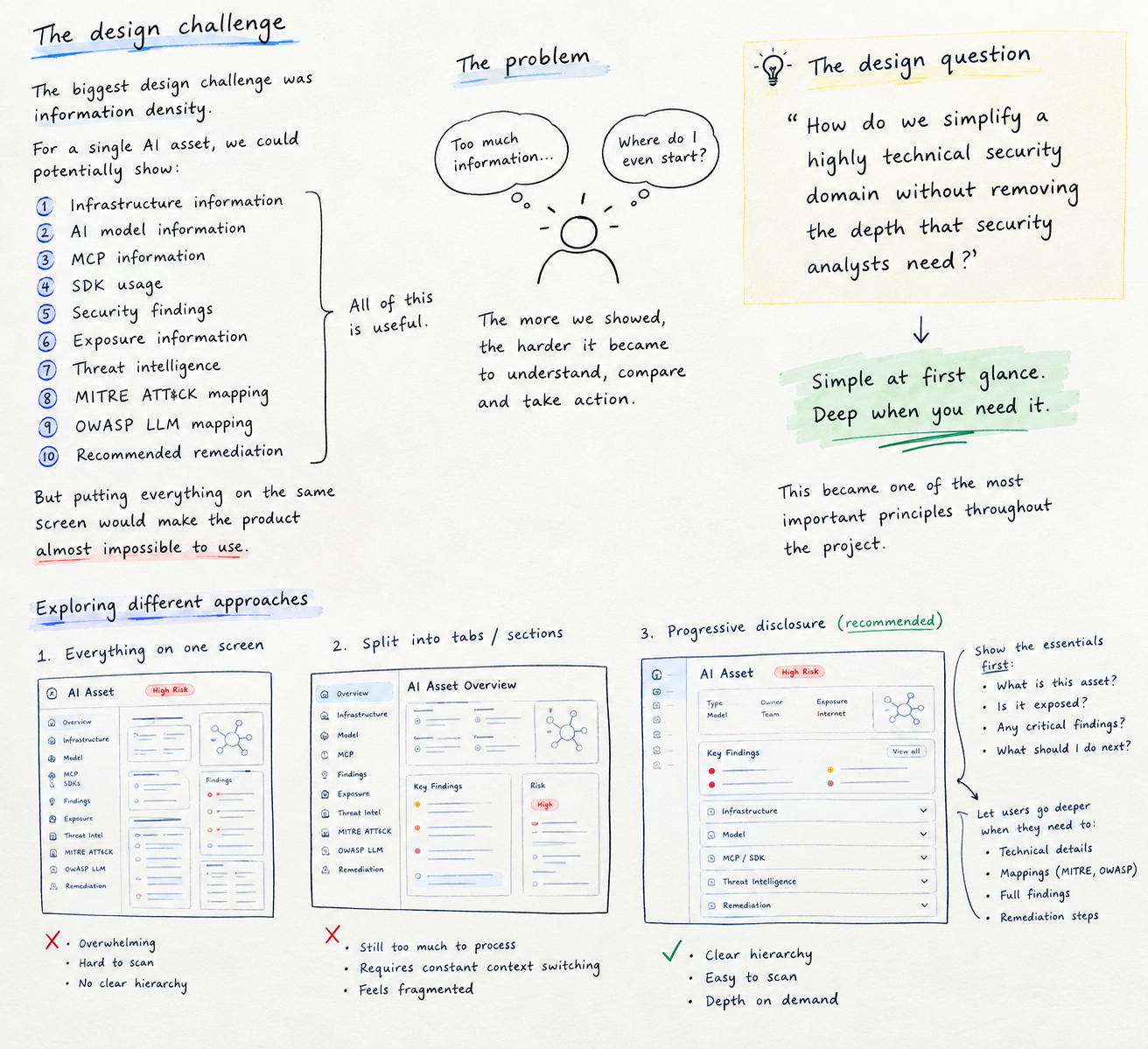
Progressive Disclosure Architecture: Level 1 Overview, Level 2 Context, Level 3 Technical Evidence
Defining the product experience
I started thinking about AIVigil around three levels of information.
What do I have?
Give me a clear view of my AI attack surface. How many assets exist? Where are they? What technologies are being used? Which assets are exposed?
What is wrong?
Help me understand the risks associated with those assets. What is exposed? What configuration is wrong? What credentials are at risk? What kind of AI-specific attack could happen?
What should I do?
Once I understand the risk, help me investigate and act. Why is this important? What could it lead to? What should I fix first? What is the recommended remediation?
Making AI assets understandable
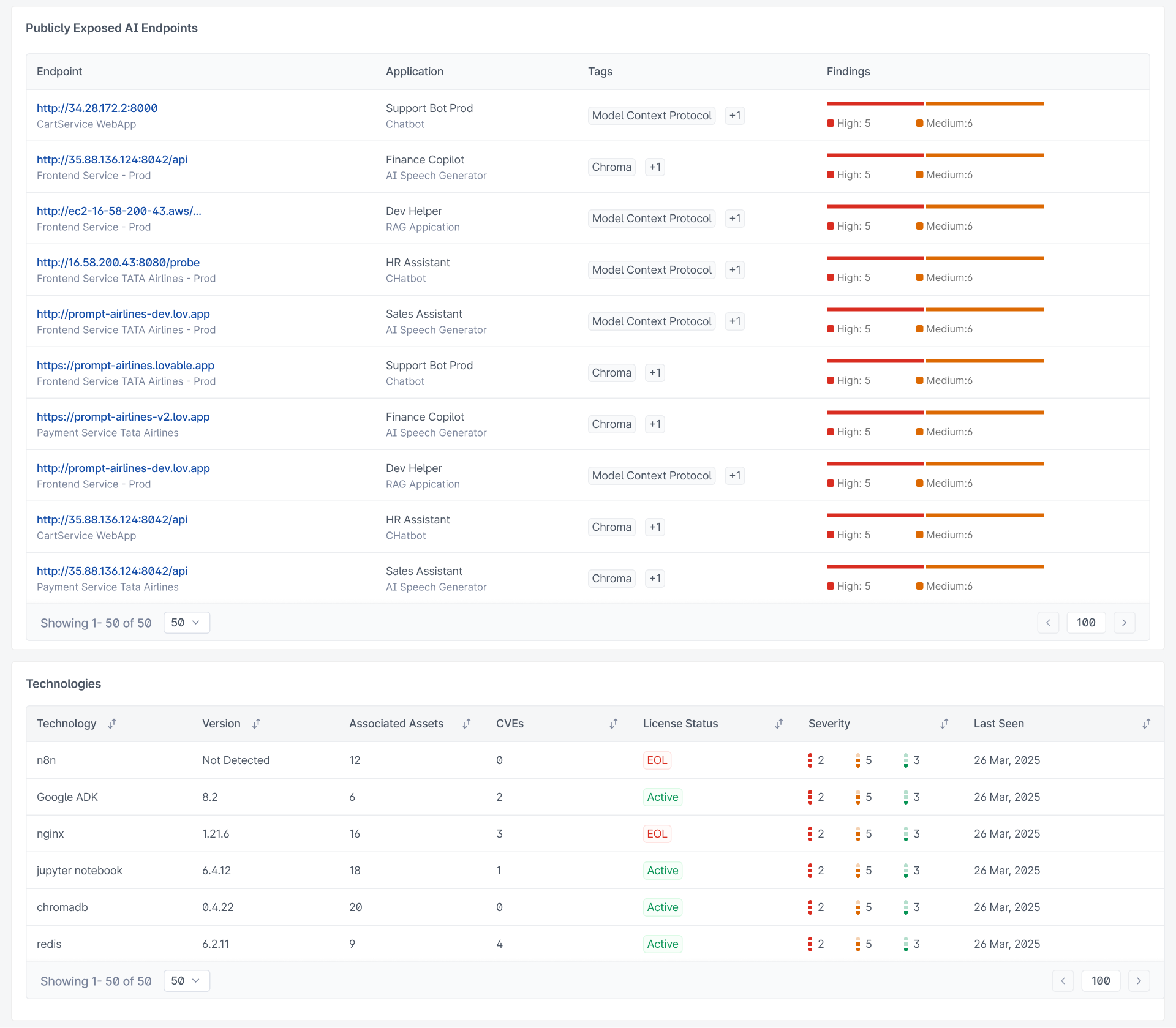
One of the most important parts of the product was the AI asset inventory.
The inventory needed to work for a simple question:
"Show me all the AI endpoints exposed to the internet."
But the same interface also needed to support more detailed investigation.
This meant the list needed to provide enough information to compare assets without turning every row into a miniature security report.
We focused on information such as:
- Asset
- Type
- Technology
- Ownership
- Exposure
- Risk
- Findings
The idea was to make the list useful for scanning first, while allowing the analyst to go deeper only when required.
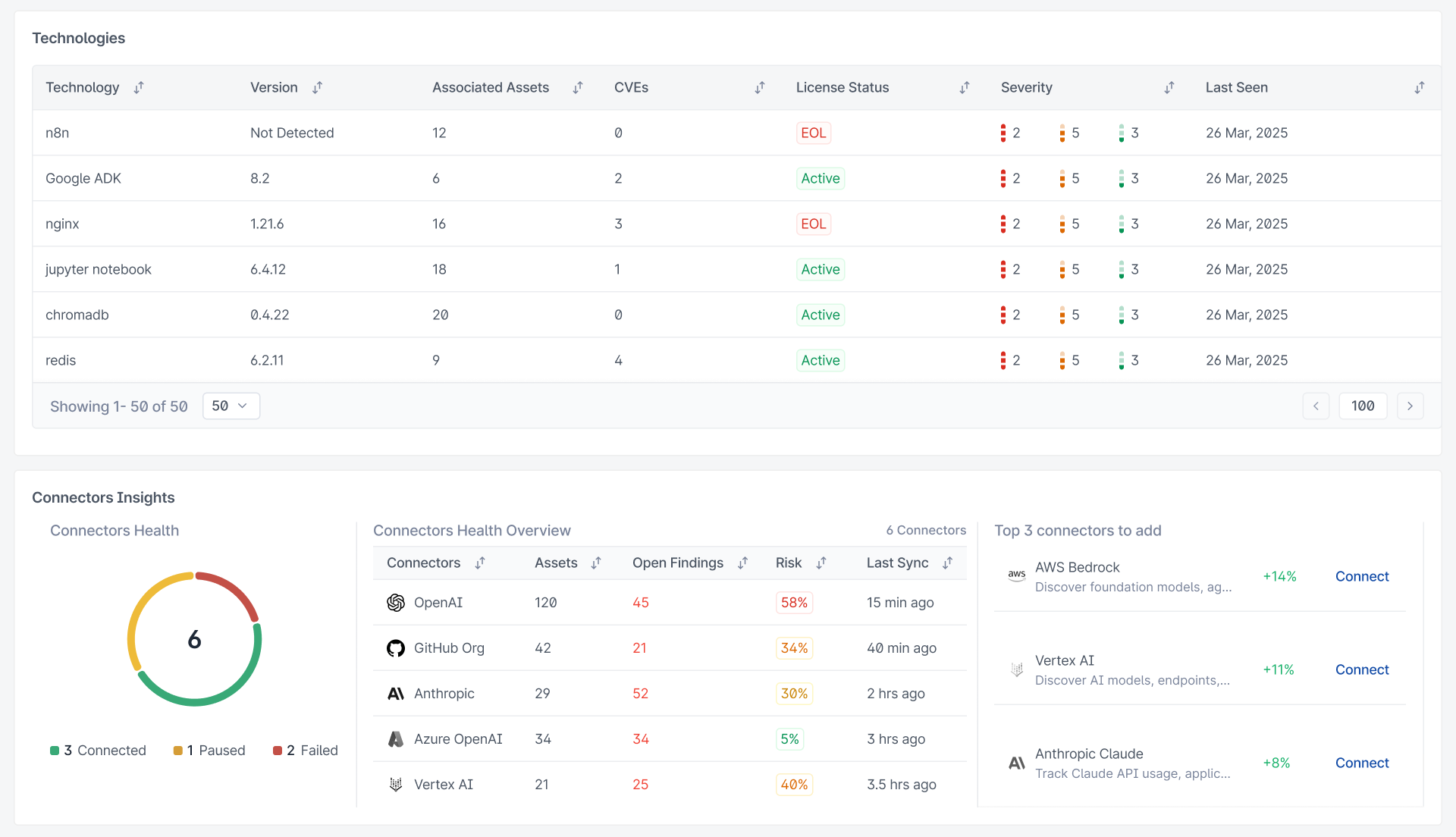
AIVigil AI Asset Inventory: Scanning technologies, models, endpoints, and health status
Showing depth without overwhelming the user
A recurring problem during the design was deciding how much information to show upfront.
Security products often have a temptation to expose everything. That makes sense from a technical perspective—if the system knows something, why not show it?
But from a UX perspective, more information can make investigation harder.
So I used progressive disclosure. The first layer answered the basic question. The next layer provided context. Deeper sections exposed technical details for users who needed them.
For example, an analyst might first see:
- 1.Exposed AI endpoint
- 2.Why it is exposed
- 3.What the endpoint is connected to
- 4.Security findings
- 5.Technical evidence and remediation
This allowed the same product to work for someone who wanted a quick understanding and someone who needed to investigate the issue in detail.
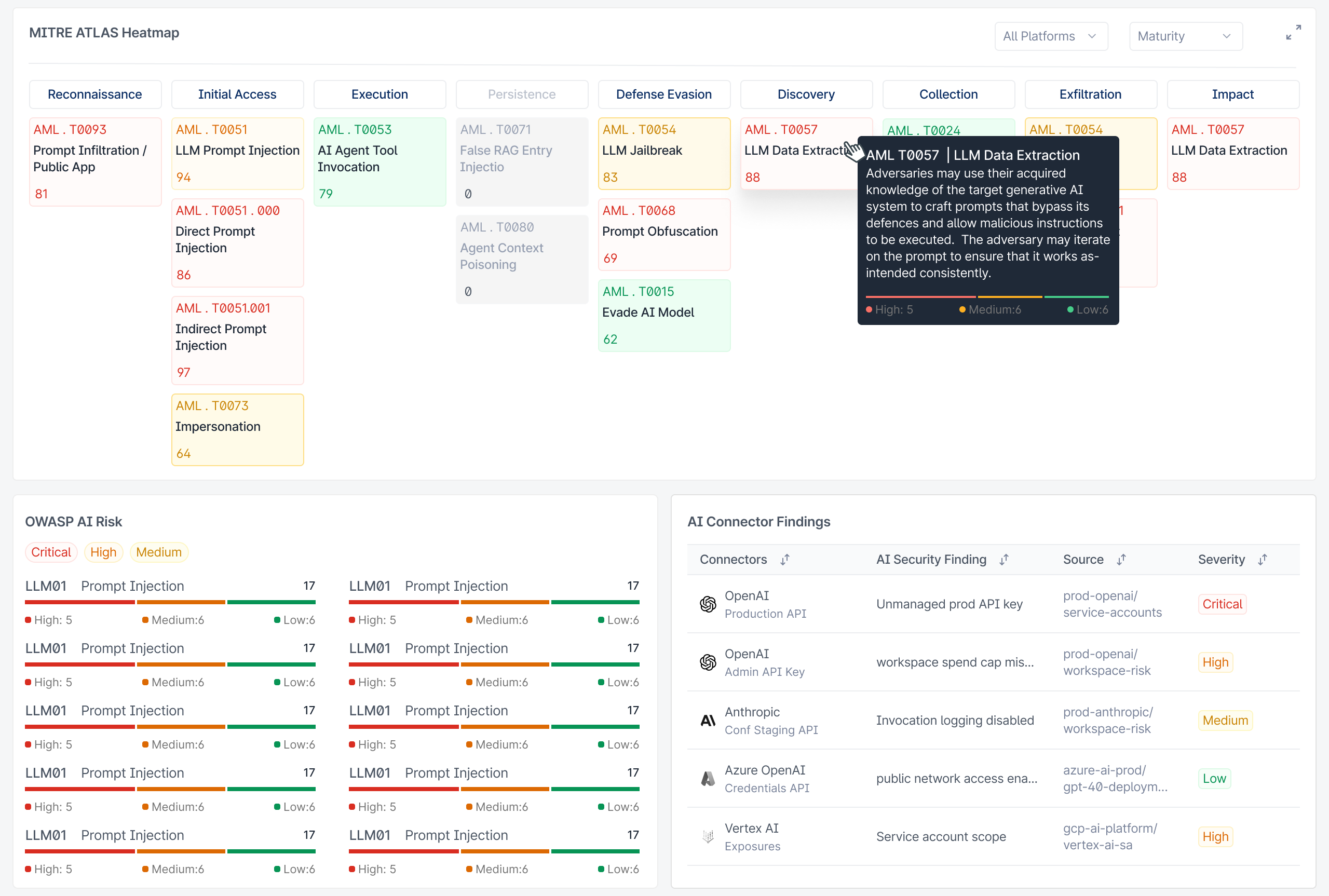
Security Framework Mapping: MITRE ATLAS tactics and OWASP Top 10 for LLM Applications
Connectors
Public discovery was only half the picture
One limitation of external discovery is that you can only see what is exposed.
A company could have AI infrastructure that isn't publicly visible but is still important from a security perspective.
That led to the idea of AI Connectors.
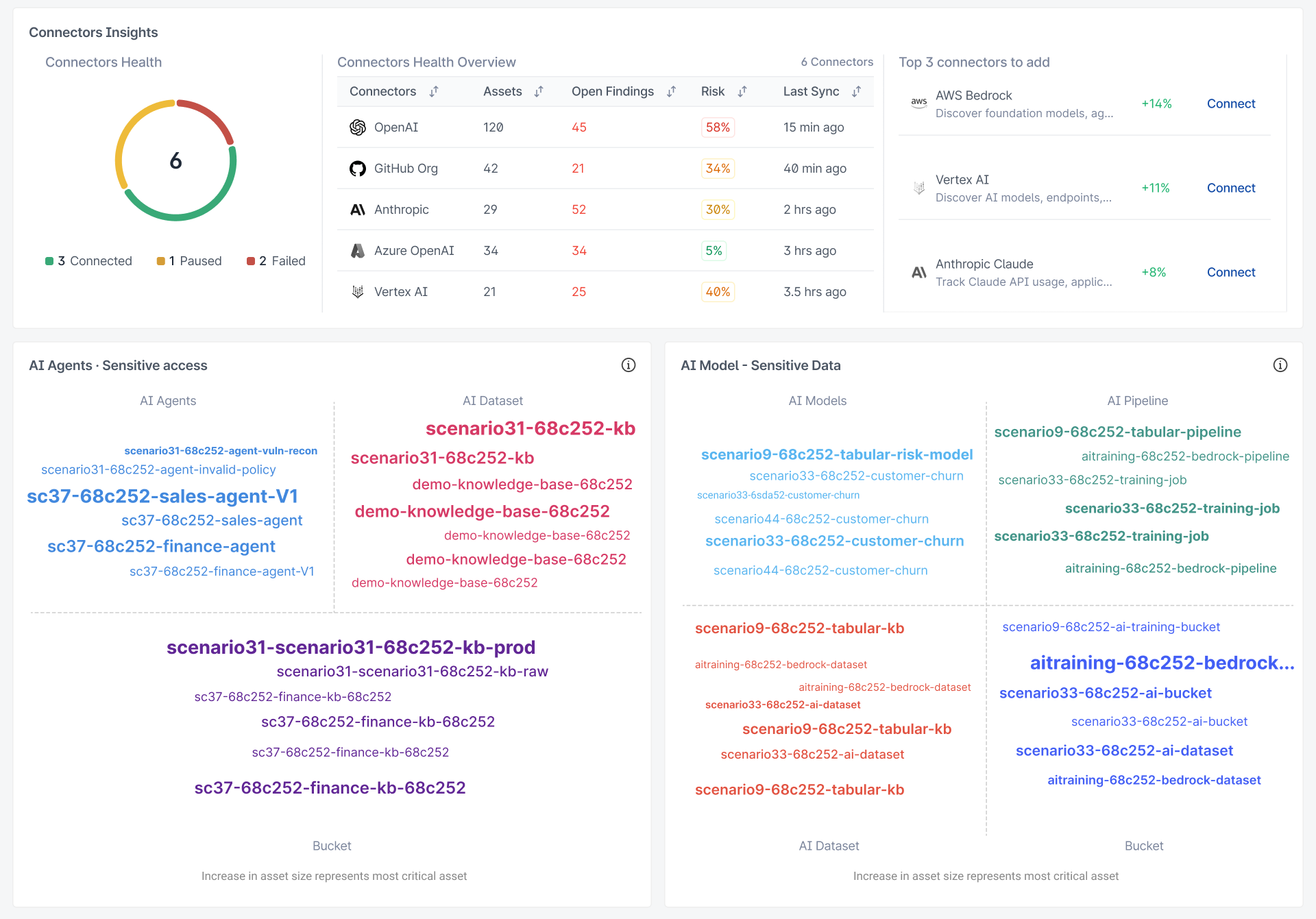
Connectors allowed AIVigil to get deeper visibility into supported AI environments.
The product could inspect things such as:
- AI deployments
- AI APIs
- Service accounts
- Credentials
- Configuration
- Model permissions
without requiring the organisation to expose its source code.
CloudSEK's current product documentation describes connectors as a way to get deeper visibility into AI environments using user-provided credentials and supported providers.
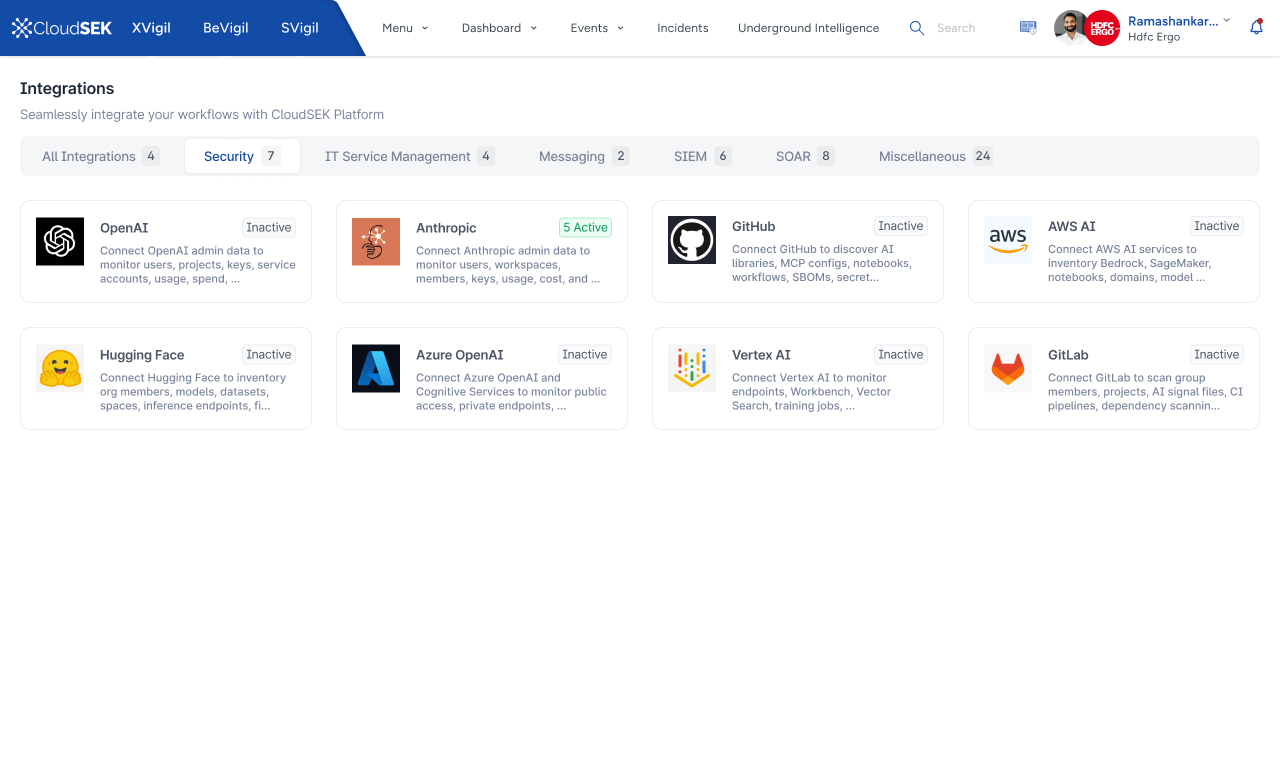
Security Connectors Grid: AWS, GCP, Azure, Anthropic, OpenAI, Hugging Face, and Vector DBs
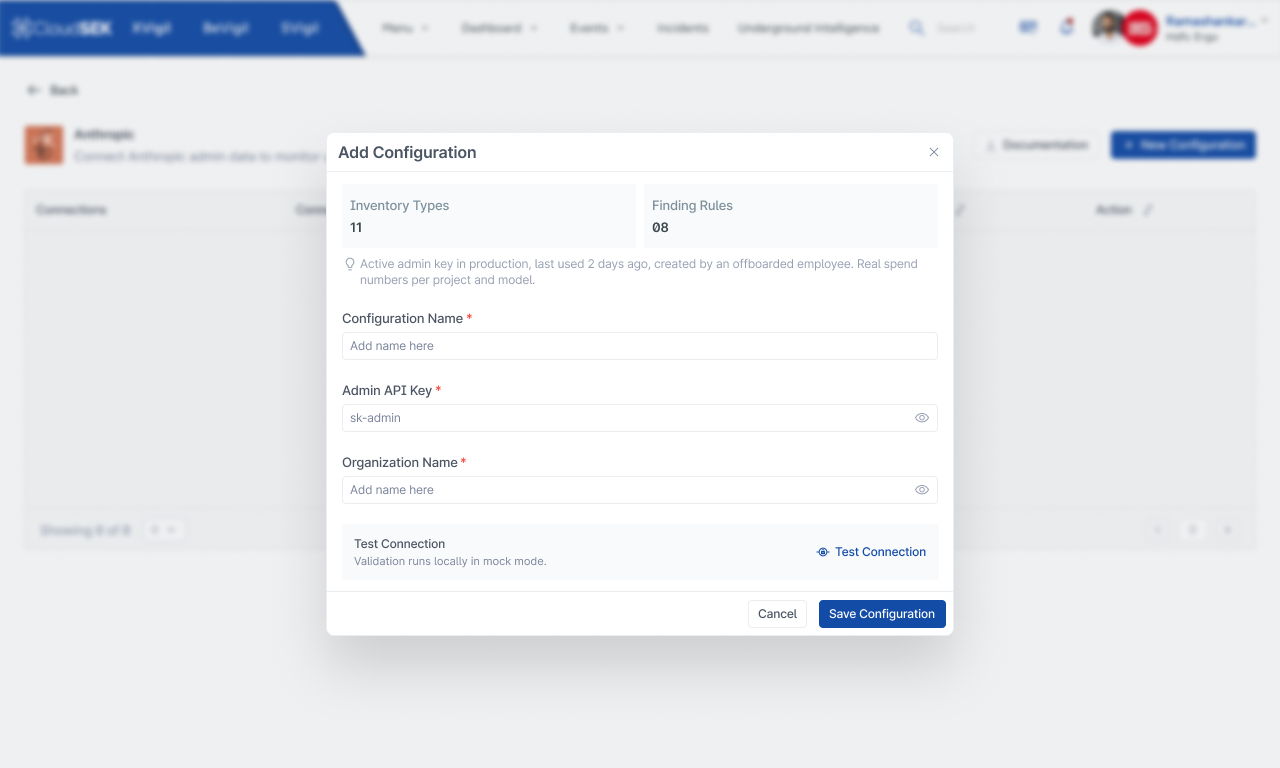
Zero-trust Connector Setup: Clear visibility into required permissions and data boundaries
Designing the connector experience
The UX challenge here was different.
With asset discovery, the user is mostly consuming information.
With connectors, the user is giving the product access to their environment.
That makes trust important.
The experience needed to answer:
- ?What am I connecting?
- ?Why do you need access?
- ?What will you be able to see?
- ?What happens after I connect it?
- ?Is my source code being accessed?
Instead of treating a connector as just another integration form, I treated it as a step in building visibility into the organisation's AI environment.
The user should understand the value before completing the setup.
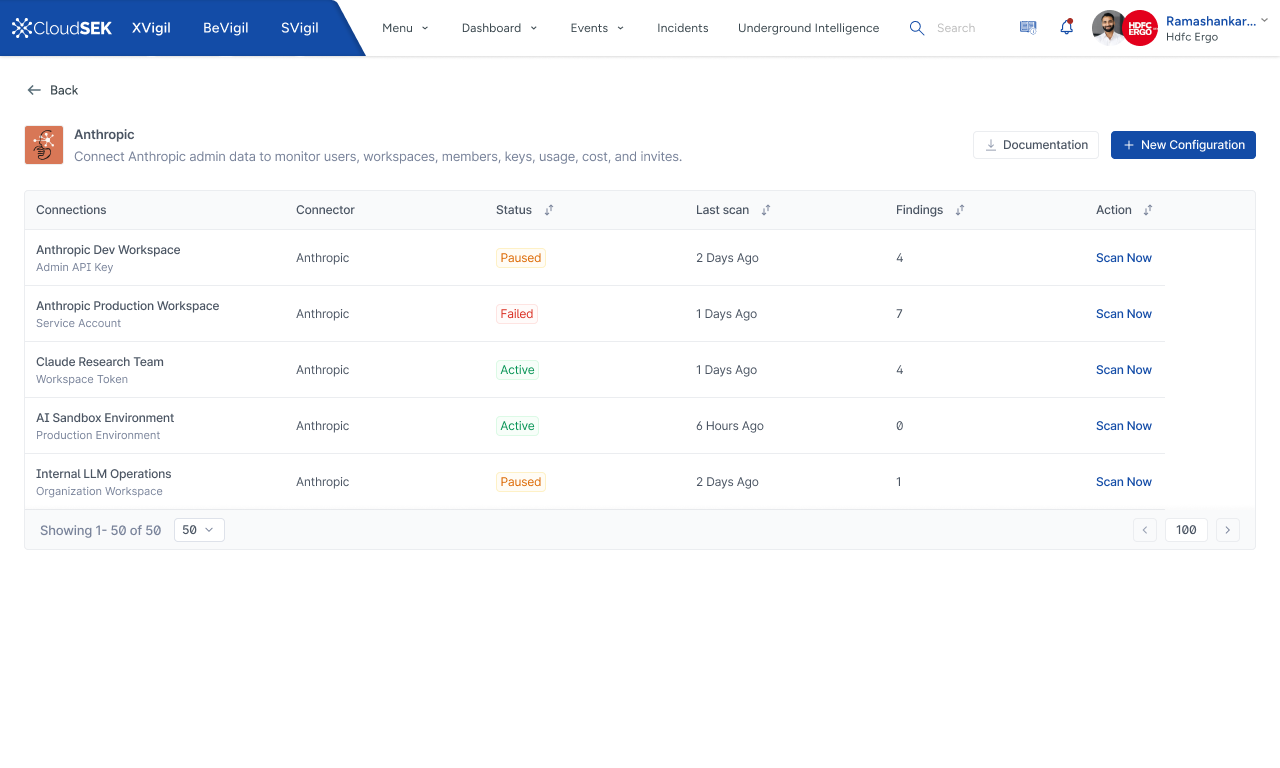
Connector Workspace & Status: Active monitoring of connected AI environments
Designing for security analysts
One of the things I learned while working on the product was that security analysts don't necessarily think in terms of individual product features.
They think in terms of investigations.
They might start with a question:
The interface therefore needed to support questions, not just navigation.
This influenced how we structured asset details, findings and supporting information.
The product needed to let the analyst follow the investigation naturally instead of constantly forcing them back into a navigation menu.
Designing for a new security category
AIVigil was not simply an existing vulnerability-management product with AI terminology added to it.
AI introduced different objects and relationships.
Asset → Vulnerability → Fix
AI application → Model → Agent → Tool → Data → Permission → Exposure → Attack
That required a different mental model.
The product needed to make these relationships understandable without requiring the user to already understand how the entire AI stack worked.
This became one of the more interesting parts of the project for me.
I wasn't just designing screens. I was helping define how users should think about this new category of security.
Key Product Design Trade-Offs
Data density vs clarity
The biggest trade-off was between showing more information and making the interface understandable. The security domain naturally pushes towards high information density.
My instinct as a designer was to simplify. But simplifying too much would remove information that analysts actually needed.
So rather than choosing one side, I used hierarchy:
Dashboard vs investigation workspace
It would have been easy to turn the overview into a traditional security dashboard with dozens of charts. But that would make the product good at reporting and not necessarily good at investigation.
I therefore treated the overview as the entry point rather than the destination.
The real value of the product came when the user moved from:
Technical accuracy vs accessibility
AI security has a lot of technical terminology: MCP, LLM endpoints, vector stores, agent permissions, model APIs, attack techniques and security controls are meaningful to experts but can quickly become overwhelming when everything is presented at once.
I didn't want to hide the technical information. Instead, I tried to make the first layer understandable and keep the deeper technical information available when needed.
This helped the product serve both the person trying to understand the security posture and the person doing the actual investigation.
The resulting experience
The final product brought several pieces together:
Find AI assets across the public attack surface and connected environments.
See what each asset is, who owns it, what technology it uses and how exposed it is.
Explore findings, technical details and security context around the asset.
Understand which exposures need attention and why.
Use contextual information and recommendations to understand what should happen next.
This created a much more complete workflow than simply presenting a list of vulnerabilities.
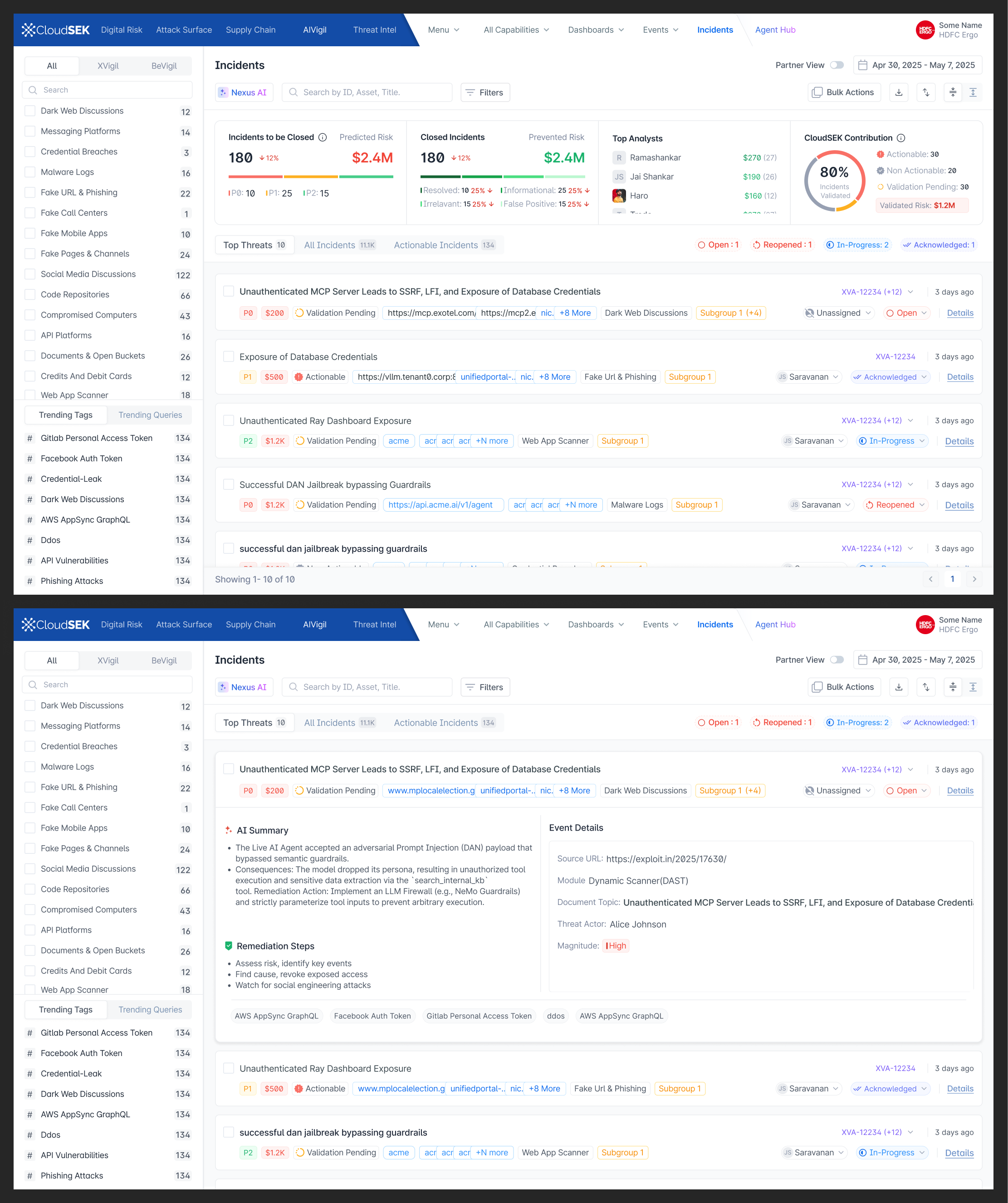
Investigation Workspace: Contextual evidence, attack path analysis, and guided remediation
What changed
AIVigil extended CloudSEK's attack surface capabilities into AI environments.
The product brought together:
- AI asset discovery
- AI security findings
- AI connectors
- Threat intelligence
- Investigation workflows
- Guided remediation
- Security framework mapping
CloudSEK's current platform describes AIVigil as one of five attack-surface categories feeding into its broader attack-path intelligence layer, alongside digital risk, threat intelligence, external attack surface and third-party risk.
For me, the important product outcome wasn't simply adding another security product.
It was creating a way for security teams to start making sense of an attack surface that was still relatively new.
What I learned
A new category needs a new mental model
When the problem itself is new, copying an existing product pattern isn't always enough. AI security introduced new objects, relationships and workflows. The product needed to help users understand those relationships.
More data doesn't mean more visibility
Security products can easily become data-heavy. But visibility isn't about showing everything. It's about helping someone understand what matters.
Analysts think in investigations
The user doesn't necessarily care which feature they're currently using. They care about answering the question in front of them. The interface should support that investigation rather than interrupt it.
Progressive disclosure is especially important in security
Security users need depth. But they don't need all of that depth at the same time. A good security interface gives users a simple starting point and lets them go deeper when they need to.
Designing AI products is not just about adding AI
The more interesting challenge is understanding how AI changes the underlying product model. In this case, AI didn't just create another feature. It created a completely new type of attack surface. And that meant rethinking how security teams discover, understand and investigate risk.
New category needs a new mental model: AI security introduced complex interconnected objects (MCP servers, Vector DBs, LLM Endpoints, Prompts). The interface must expose relationships, not isolated alerts.
Context over raw findings: Visibility is about answering "What matters most right now?" rather than overwhelming analysts with thousands of unprioritized alerts.
Guided investigation path: Transitioning security analysts from Discovery → Understanding → Investigation → Action creates a frictionless workflow.